Deposit Money on ExpertOption via Crypto: Methods & Limits
Writen By

Online Trading Platform Researcher and Guide Writer
Researches broker platforms and trading account Systems.
If you plan to deposit crypto into your ExpertOption account, expect a few platform-specific steps: choosing the supported coin and network, confirming transaction fees, and waiting for blockchain confirmations before funds are available. Mistakes such as sending the wrong token or using an incorrect network are irreversible, so verify the exact deposit address, any required memo/tag, and whether withdrawals from your exchange include extra processing delays before you send funds.
Below you’ll find how crypto funding options are presented in the deposit flow, what to expect for minimums, processing times, and common provider restrictions. The overview also highlights verification and security checks that can affect withdrawals, plus practical actions—such as doing a small test transfer and saving the transaction ID—so you can fund your trading account with fewer delays and clearer expectations.
Below you’ll find how crypto funding options are presented in the deposit flow, what to expect for minimums, processing times, and common provider restrictions. The overview also highlights verification and security checks that can affect withdrawals, plus practical actions—such as doing a small test transfer and saving the transaction ID—so you can fund your trading account with fewer delays and clearer expectations.

Deposit via Crypto?
The minimum deposit is 10 USD and we have good news for you: We dont charge any fees when you make a deposit.1. Visit ExpertOption.com website or mobile app.
2. Login to your trading account.
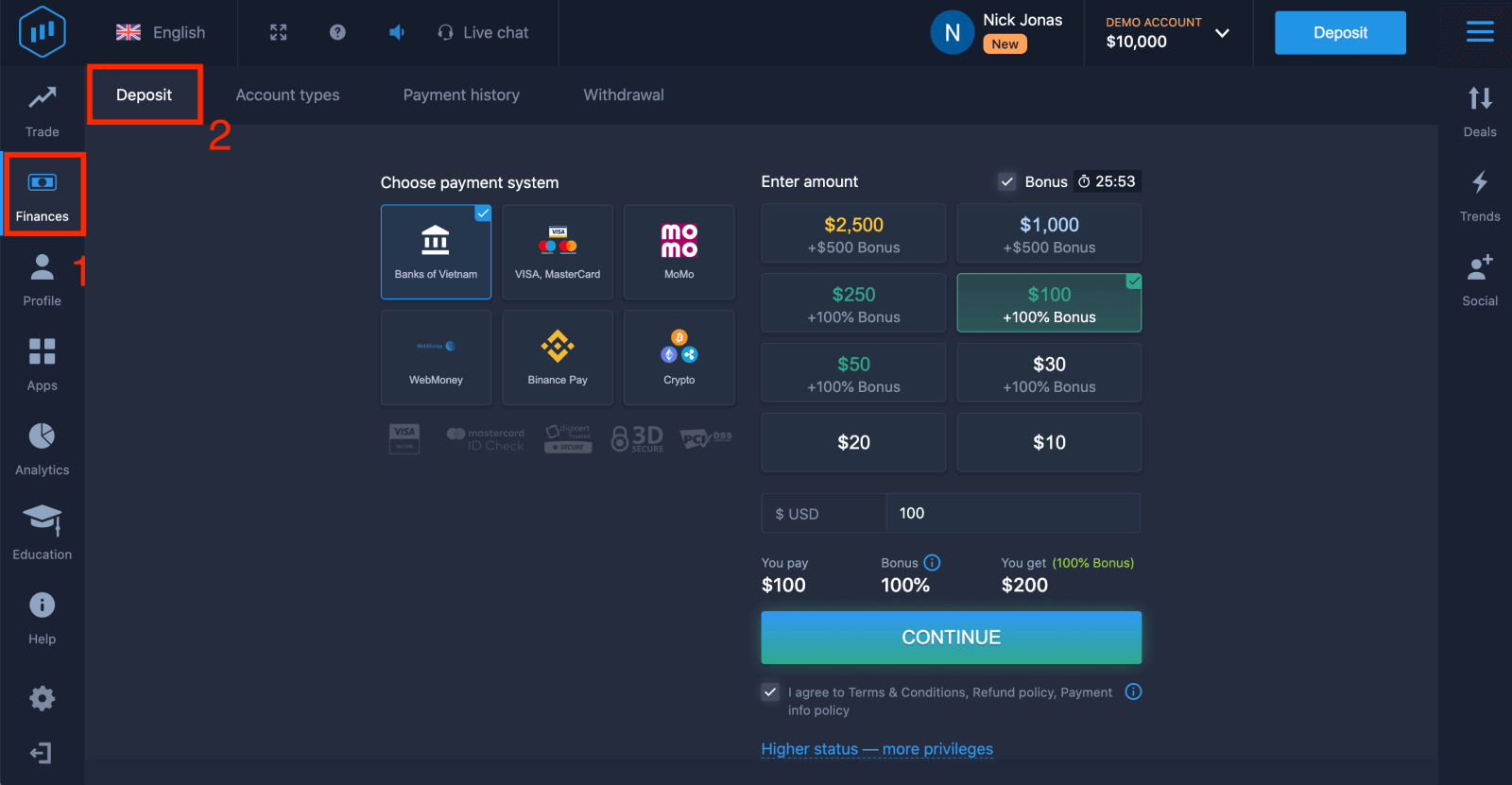
3. Click on the “Finances” on the left upper corner menu and click "Deposit".
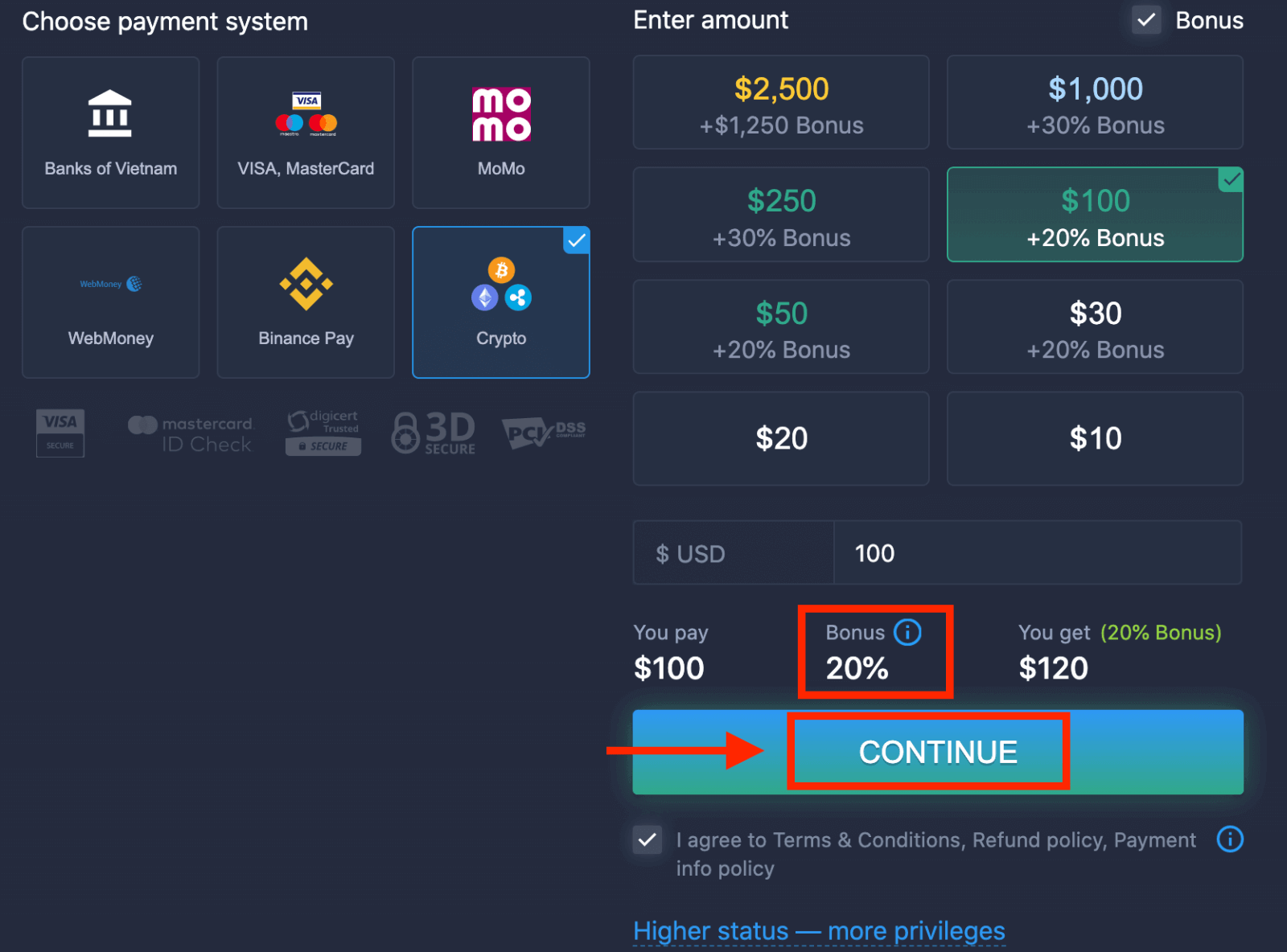
 4. Select "Crypto" or "Binance Pay".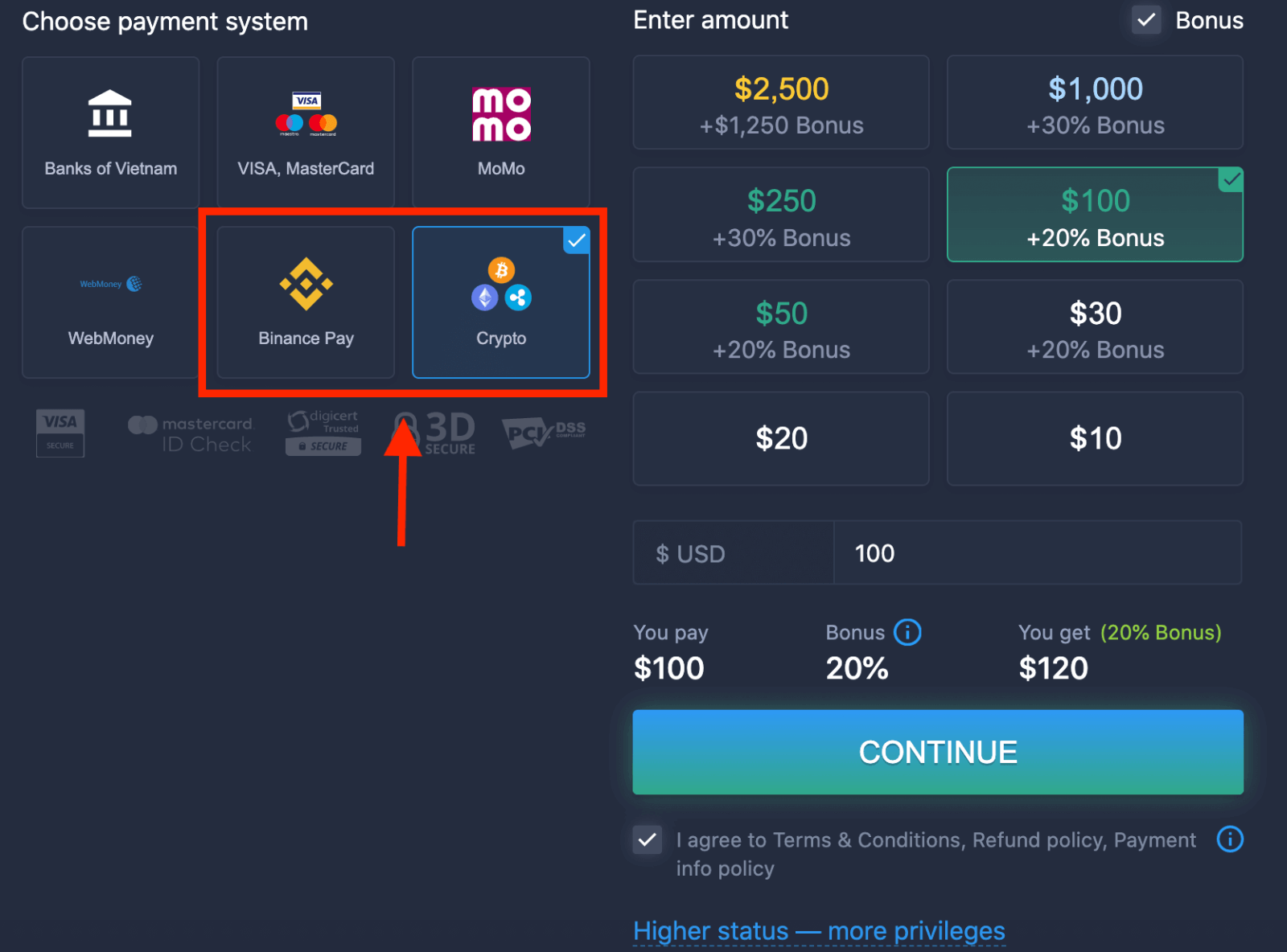
5. You may enter a deposit amount manually or select one from the list.
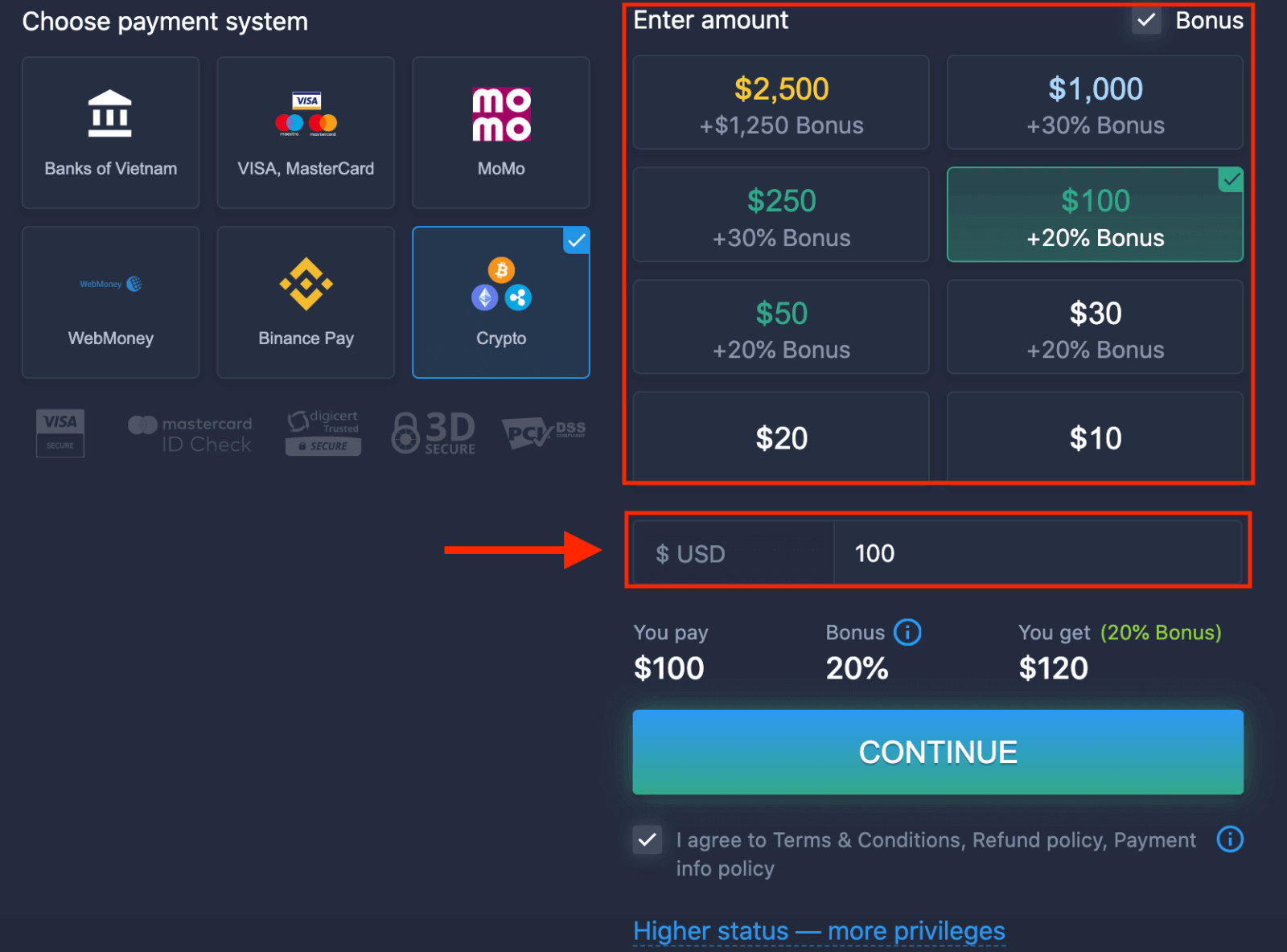
6. The system may offer you a deposit bonus, take advantage of the bonus to increase the deposit. After that, click "CONTINUE".
5. You will be redirected to a new page where you can get the address and send exactly the crypto to that address.
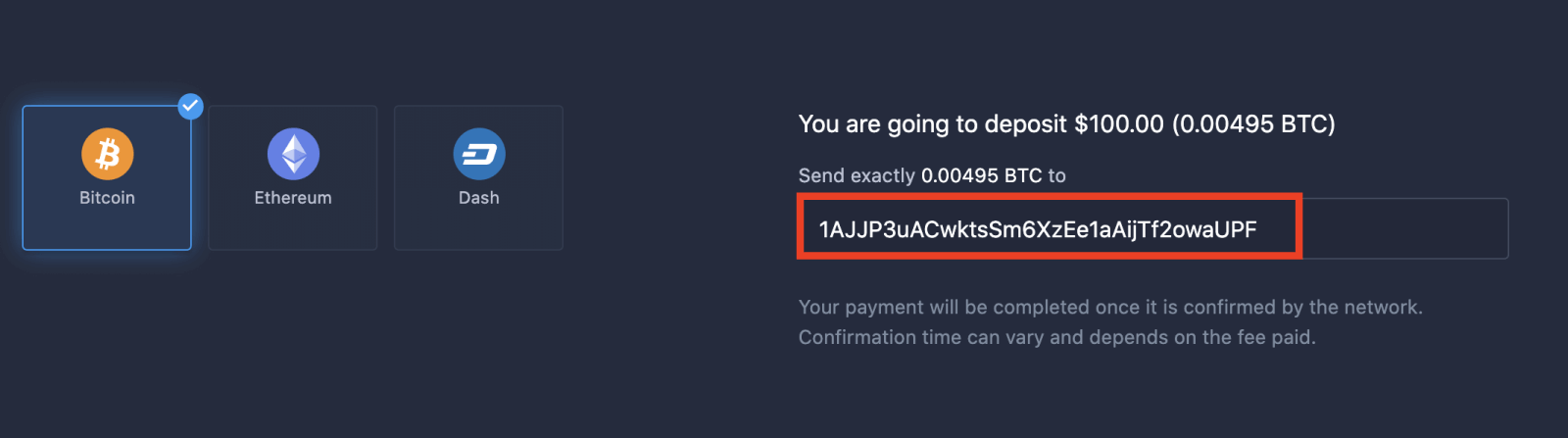
Your payment will be completed once it is confirmed by the network. Confirmation time can vary and depends on the fee paid.
Higher status — more privileges
| Micro | Basic | Silver | Gold | Platinum | Exclusive |
|
For those who prefer light start. Upgrade to higher status when ready |
For those who prefer light start. Upgrade to higher status when ready | Majority of our clients start with Silver account. Free consultations included | Smart investments start with Gold account. Get most from your account with privileged features | Our best expertise and exclusive account management for serious investors | Ask your account manager for additional information |
|
from $10
|
from $50
|
from $500
|
from $2,500
|
from $5,000
|
Invitaiton only |
Account Types
| Micro | Basic | Silver | Gold | Platinum | Exclusive | |
|
Education materials
|
 |
 |
 |
 |
 |
 |
|
Daily Market Reviews and Financial research
|
 |
 |
 |
 |
||
|
Priority withdrawal
|
 |
 |
 |
|||
|
Maximum number of simultaneously open deals
|
10
|
10 | 15 | 30 | no limit | no limit |
|
Maximum deal amount
|
$10
|
$25 | $250 | $1000 | $2,000 | $3,000 |
|
Increased asset profit
|
0
|
0 | 0 | up to 2% | up to 4% | up to 6% |
FAQs
ExpertOption shows the minimum deposit amount in the deposit window and it may vary by coin and your account currency. Many brokers set modest retail minimums, but always confirm the exact value shown during the deposit flow before sending funds to avoid transferring amounts below the platform minimum.
Log in, open the Deposit page, select Crypto as the payment method and choose the coin and network. The platform will provide a wallet address or QR code—copy it exactly, include any memo/tag if required, then send the funds from your external wallet or exchange. Wait for the required blockchain confirmations and keep the transaction ID for support if needed.
First check the number of confirmations required by ExpertOption and that you used the correct network and token. If you withdrew from an exchange, that provider may show a completed status before blockchain confirmations finish. Verify the TXID on a block explorer, confirm the exact address and token used, and contact ExpertOption support with the TXID and screenshots if crediting is delayed.
Depositing crypto typically credits your trading balance, but withdrawals and larger transfers may trigger KYC/AML checks. ExpertOption may require identity documents before approving withdrawals or higher limits. Review account verification requirements and any deposit-to-withdrawal rules in the platform’s terms to avoid surprises when cashing out.
Crypto transfers are irreversible, so double-check the address, network, and token before sending. Use a small test deposit first, save the transaction ID, enable strong account security like two-factor authentication, and avoid using public Wi-Fi when transacting. If unsure, consult support before sending large amounts.